Work tracking across Outlook and Teams
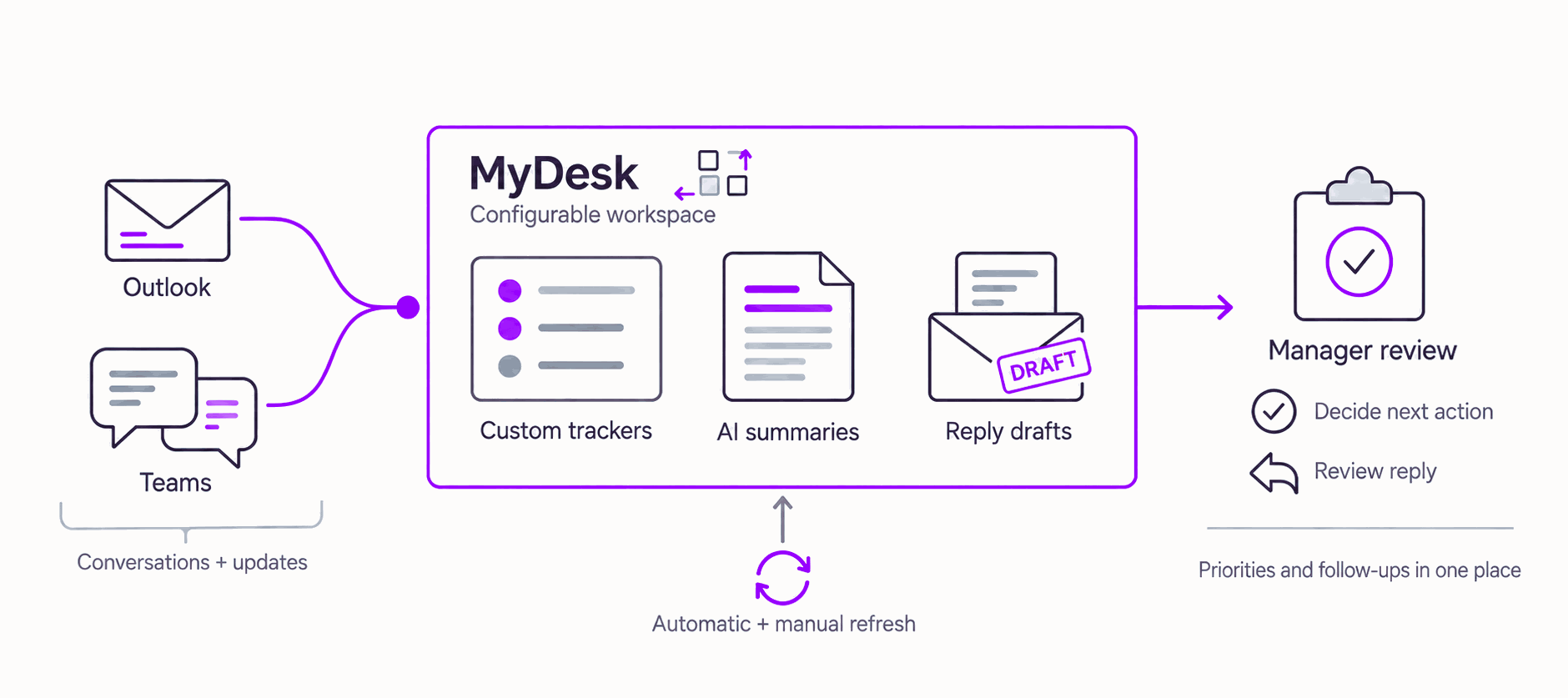
Bring actions, summaries and draft replies into one workspace. Managers review replies and confirm completion.
The problem
Priorities, actions and updates were scattered across Outlook and Teams. Managers had to open each conversation to see what was still pending.
What we built
A configurable workspace with trackers, AI activity summaries and draft replies. Updates refresh automatically.
Where it runs
Direct Outlook integration and Teams activity tracking. Users build their own trackers and arrange widgets around the work they follow.
Work tracking, summaries and reply preparation consolidated in one workspace.
Delivered for production use.
Industry: food manufacturing. Client details and metrics are shared after an NDA, to protect our clients’ interests.
From source to a reviewed answer, in three steps.
- 01
Outlook and Teams
Actions and updates from email and conversations.
- 02
AI prepares the work
Custom trackers, activity summaries and draft replies.
- 03
The manager confirms
Review replies and confirm when work is complete.
System capabilities
- Sources
- Outlook email
- Teams conversations
- Workspace
- Custom trackers
- Configurable widgets
- AI
- Activity summaries
- Reply drafts
- Updates
- Incremental refresh
- Manual refresh
- Control
- Reply review
- User-confirmed completion
Check the controls, or compare other systems.
Discuss your work tracking workflow.
Tell us how actions move between Outlook, Teams and your trackers today. We’ll help you identify a practical starting point.
founders@amotion.ai