Contract review, approvals and renewal tracking
Search contracts, analyse clauses and manage approvals and renewal dates in one workspace. Legal reviewers retain sign-off.
The problem
Contracts moved through email and shared folders. Legal teams read clauses, chased approvals and tracked renewals with no single view of each contract’s status.
What we built
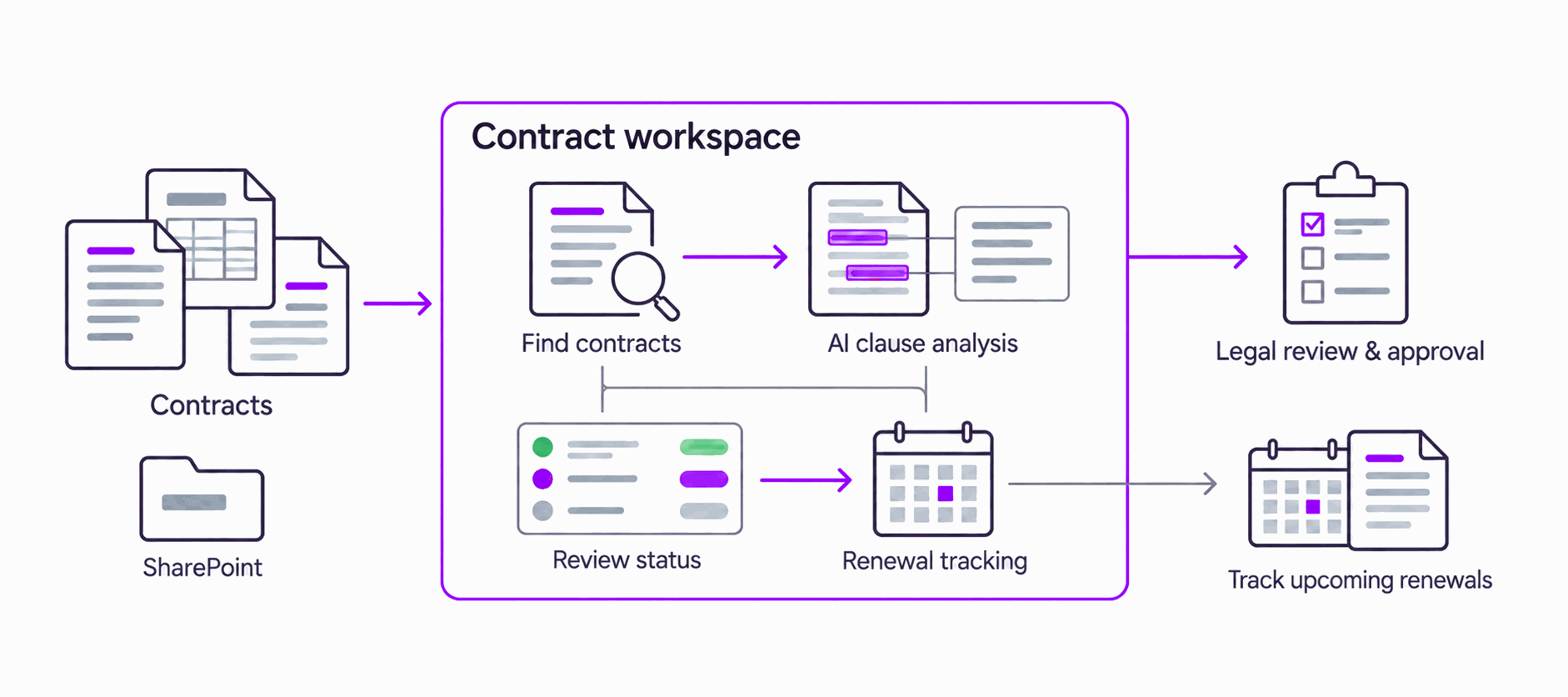
A contract workspace with search, AI clause analysis and contract Q&A, review and approval workflows, and renewal tracking.
Where it runs
A contract management application with SharePoint as the document store. AI analysis sits beside human review.
One workflow for contract review, approvals and renewal tracking.
Live in production. Legal reviewers retain sign-off.
Industry: food manufacturing. Client details and metrics are shared after an NDA, to protect our clients’ interests.
From source to a reviewed answer, in three steps.
- 01
Contracts
Documents in shared folders and email.
- 02
AI supports review
Find contracts, analyse clauses and route approvals.
- 03
Legal keeps sign-off
Reviewers approve changes; renewal dates are tracked.
System capabilities
- Documents
- Document store
- Contract search
- Analysis
- Clause analysis
- Contract Q&A
- Review
- Review workflows
- Legal oversight
- Approval
- Approval workflows
- Human sign-off
- Lifecycle
- Renewal tracking
- Contract workspace
Discuss your contract workflow.
Tell us how contracts are reviewed, approved and tracked today. We’ll help you identify a practical starting point.
founders@amotion.ai